

1. GRN क्या होता है?
GRN (Goods Receipt Note) ek important store document hai jo tab generate hota hai jab supplier se material store me physically receive hota hai.
Ye ek acknowledgement slip/document hota hai jo confirm karta hai ki maal store ne receive kar liya hai aur wo maal purchase order (PO) ke according hai ya nahi.
👉 Iska main purpose hai –
- Proof of material received
- Material ka record maintain karna
- Vendor ko payment process karne ke liye approval dena
- Accounts aur audit ke liye base document provide karna
2. GRN banane ki ज़रूरत क्यों है?
Aap soch rahe hoge ki direct gate entry + challan par sign karke kaam chal sakta hai. Lekin professional aur systematic store me GRN mandatory hota hai kyunki:
- Audit trail maintain hoti hai.
- Vendor ke against payment release tabhi hota hai jab GRN confirm hota hai.
- Agar material short / damage / wrong item aaya hai, to GRN par remark likh ke vendor ko return process shuru kiya ja sakta hai.
- Inventory records me accurate stock reflect hota hai.
- ERP systems (SAP, Oracle, Nway, Tally ERP, etc.) me stock increase karne ke liye GRN entry required hoti hai.
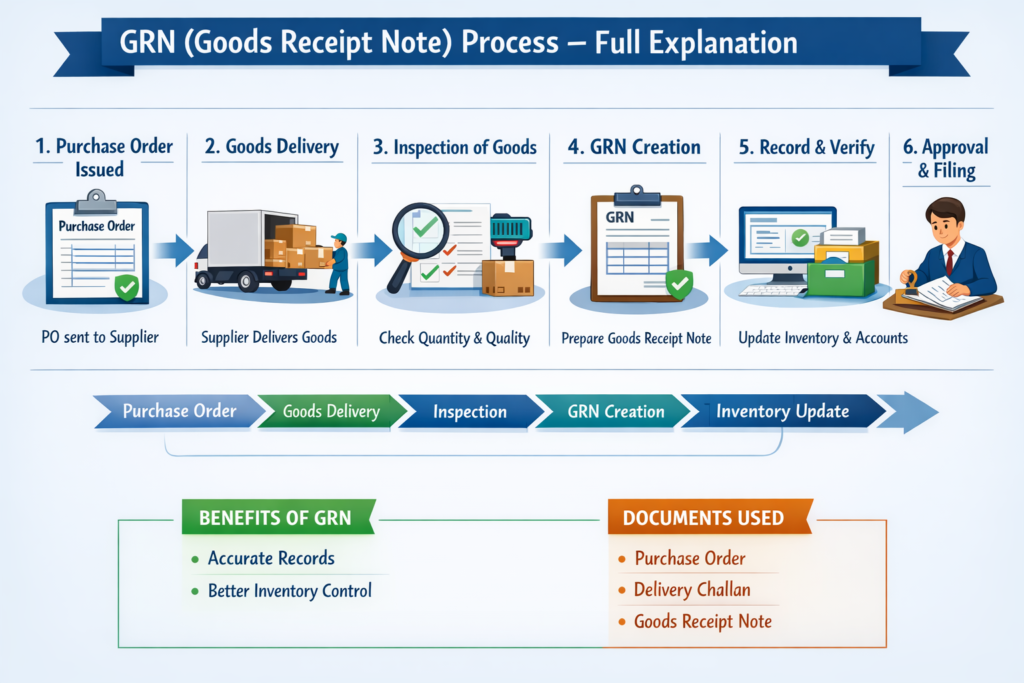
3. GRN ka Flow / Process (Step-by-Step)
🔹 Step 1 – Material Receiving at Gate
- Jab bhi vendor ka truck/vehicle material leke aata hai, sabse pehle Gate Entry Register me entry hoti hai.
- Vendor driver se Challan / Invoice / E-way bill liya jata hai.
- Security guard gate pass banata hai aur material ko unloading area me bhej deta hai.
👉 Isko bolte hain Gate Inward Entry.
🔹 Step 2 – Physical Verification of Material
- Store team unloading ke baad saara material count karti hai.
- Check kiya jata hai:
- Quantity → PO ke against sahi hai ya nahi
- Quality → Material damage / broken / rusted to nahi hai
- Specification → Ordered item aur received item match kar rahe hain ya nahi
👉 Agar koi problem hai (shortage / damage / mismatch), to Discrepancy Note banaya jata hai aur remark ke sath GRN par likha jata hai.
🔹 Step 3 – Matching with Purchase Order (PO)
- Storekeeper PO ki copy nikal ke challan se match karta hai.
- Agar PO aur challan dono match karte hain, tab GRN process aage badhta hai.
- Agar mismatch ho (wrong material, excess qty, unauthorized supply), to material hold kar diya jata hai aur GRN banane se mana kar diya jata hai.
🔹 Step 4 – Preparation of GRN (Goods Receipt Note)
Ab store incharge GRN prepare karta hai. Isme likha jata hai:
- GRN Number (Auto generated ERP ya Manual Register ka)
- Date & Time of receipt
- Vendor Name & Address
- PO Number aur Date
- Challan / Invoice Number
- Description of Material
- Quantity Ordered, Quantity Received, Quantity Accepted
- Unit of Measurement (Nos, Kg, Meter, etc.)
- Remarks (Short / Damage / Excess / OK)
- Inspection authority ka sign (agar QC dept hai to unka bhi)
- Store incharge ka signature
👉 Ye ek official acknowledgement hota hai ki maal store ne receive kiya hai.
🔹 Step 5 – Inspection & Quality Check (QC)
- Kuch organizations me Quality Control (QC) team alag hoti hai jo store ke sath material inspect karti hai.
- Agar material technical hai (ex: electrical items, cement, steel, chemicals, etc.), to QC approve karega tabhi GRN final hoga.
- Agar QC reject karta hai, to GRN par Rejected remark aa jata hai aur material vendor ko wapas bhej diya jata hai.
🔹 Step 6 – Updating ERP / Stock Register
- GRN finalize hone ke baad store team ERP me entry karti hai.
- ERP me automatic stock update ho jata hai aur inventory increase ho jata hai.
- Manual system me Bin Card / Stock Ledger update hota hai.
🔹 Step 7 – Circulation of GRN
Final GRN ke 3-4 copies banti hain:
- Accounts Department → Vendor payment ke liye.
- Purchase Department → Vendor performance aur future procurement ke liye.
- Store File → Audit aur stock record ke liye.
- QC / User Dept (optional) → Reference ke liye.
🔹 Step 8 – Vendor Payment Process
- Jab accounts department ke paas GRN copy aati hai, tabhi vendor ka bill process hota hai.
- Agar GRN available nahi hai, to accounts vendor ka bill hold kar dete hain.
- Matlab GRN hi vendor ke payment ka base document hai.
4. GRN Format (Sample)
| Field | Details |
|---|---|
| GRN No. | GRN/2025/045 |
| Date | 20-09-2025 |
| Supplier Name | M/s ABC Traders |
| PO No. | PO/2025/123 |
| Challan No. | 6789 |
| Material Description | Mild Steel Rod 12mm |
| Qty Ordered | 1000 Kg |
| Qty Received | 980 Kg |
| Qty Accepted | 980 Kg |
| UOM | Kg |
| Remarks | Short by 20 Kg |
| Inspected by | QC Team |
| Store Incharge Sign | ______ |
5. GRN Process – Example (Construction Site)
Maan lo ek construction project me cement bags mangaye gaye hain.
- Gate Entry: Truck aaya, challan par likha hai 500 bags.
- Physical Check: Store team count karti hai aur paati hai 495 bags hi aaye.
- PO Matching: PO me bhi 500 bags ordered hain.
- Discrepancy: 5 bags short hain. Store remark likhta hai “Short supply – 5 bags”.
- GRN Preparation: GRN me accepted qty 495 likh di jaati hai.
- QC Approval: QC check karke approve kar deta hai.
- ERP Update: Stock me 495 bags add ho jate hain.
- Vendor Payment: Accounts sirf 495 bags ka hi payment karega.
👉 Is tarah GRN audit-proof aur foolproof document ban jata hai.
6. GRN ke Fayde (Advantages)
- Transparency in store operation
- Vendor ke sath disputes kam hote hain
- Stock records accurate hote hain
- Audit aur compliance easy hota hai
- Payment cycle controlled aur verified hota hai
7. GRN Process me Challenges
- Kabhi kabhi late QC approval hone ki wajah se vendor payment delay hota hai.
- ERP me wrong entry hone se stock mismatch ho jata hai.
- Agar manual system ho to duplicate GRN ka risk hota hai.
- Vendor aur store ke beech shortage disputes common hote hain.
8. GRN – Best Practices
- Har GRN ka unique number hona chahiye.
- GRN banate waqt PO aur Challan compulsory match karo.
- GRN par remarks hamesha clearly likho (OK, Short, Damage, Reject).
- QC approval bina GRN close mat karo.
- ERP entry aur manual stock register dono maintain karo.
✨ Conclusion
Store me GRN ek lifeline document hai jo ensure karta hai ki:
- Material PO ke according receive hua hai
- Vendor ko payment genuine supply par hi ho
- Stock record accurate rahe
- Audit ke time koi dikkat na aaye.