


Duniya WhatsApp pe chalti hai — aur ab sirf chats hi nahi, updates bhi yahin milte hain.
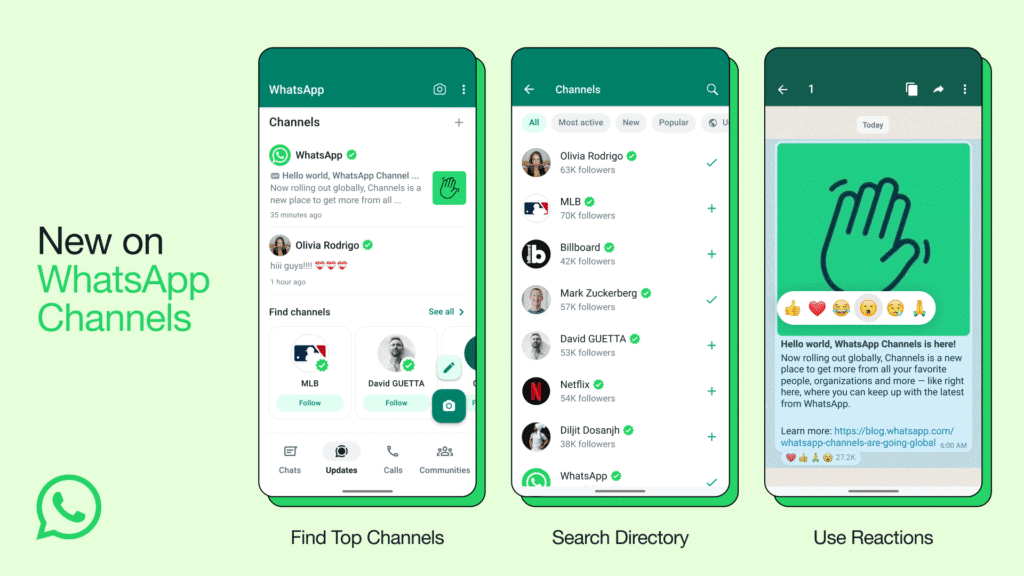
2025 mein, WhatsApp Channels ek revolutionary feature ban chuka hai. Ye feature Meta ne design kiya hai un logon ke liye jo public updates share karna chahte hain — jaise brands, creators, influencers, aur government agencies.
Simple words mein:
👉 WhatsApp Channel ek one-way broadcast tool hai jahan admin update bhej sakta hai, aur followers bas receive karte hain.
Koi reply nahi, koi chat nahi — bas clear, focused updates.
🔍 SEO Keywords for 2025
(Use these naturally in your content for higher Google ranking)
- WhatsApp Channel kaise banaye
- WhatsApp Channel create step by step
- WhatsApp Channel features
- WhatsApp Channel kya hota hai
- WhatsApp Channel use kaise kare
- WhatsApp Channel benefits
- WhatsApp Channel on iPhone/Android/Web
- WhatsApp Channel guide 2025
- WhatsApp Channel India launch
🧭 WhatsApp Channel Banane ke Fayde (Benefits of WhatsApp Channels)
- Direct Reach – Public posts ke liye perfect, bina kisi spam ke.
- Privacy Maintained – Followers ka number aur details hidden rehti hain.
- No Algorithm Drama – Jaise Instagram ya Facebook ka feed confuse karta hai, WhatsApp Channel direct deliver karta hai.
- Business Friendly – Brands apne latest offers, discounts aur updates share kar sakte hain.
- Free Marketing Tool – Bilkul free, zero cost me aapka personal newsfeed.
📱 WhatsApp Channel Kaise Banaye – Step-by-Step Guide (2025 Updated)
Requirement:
- Latest WhatsApp version (Android, iOS ya Web)
- Active WhatsApp account
- A clear idea of your Channel name & purpose
Step 1: WhatsApp Update Karo
Sabse pehle apne WhatsApp ko Play Store ya App Store se update karo.
Old version me “Channels” tab dikhega hi nahi, so keep it fresh.
Step 2: “Updates” Tab Me Jao
Open WhatsApp → Bottom (ya left side) me “Updates” tab milega.
Yahin pe Channels ka section hota hai.
Step 3: “Create Channel” Pe Tap Karo
Scroll thoda niche jao, aur “+ Create Channel” option pe click karo.
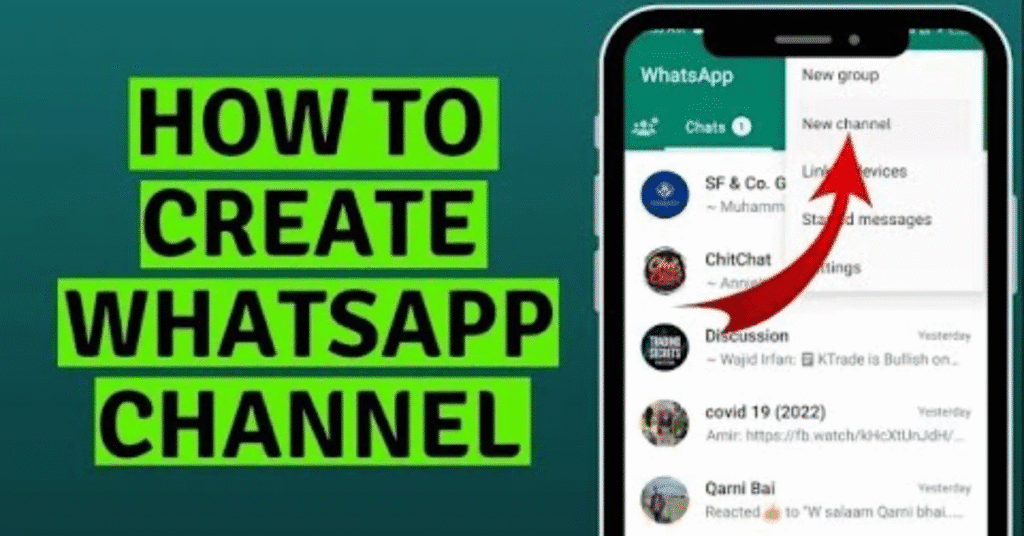
- Ye option aapko ‘Your Status’ ke neeche milega.
- Agar aap pehli baar bana rahe ho, to WhatsApp kuch permissions puchega — bas “Continue” pe tap kar do.
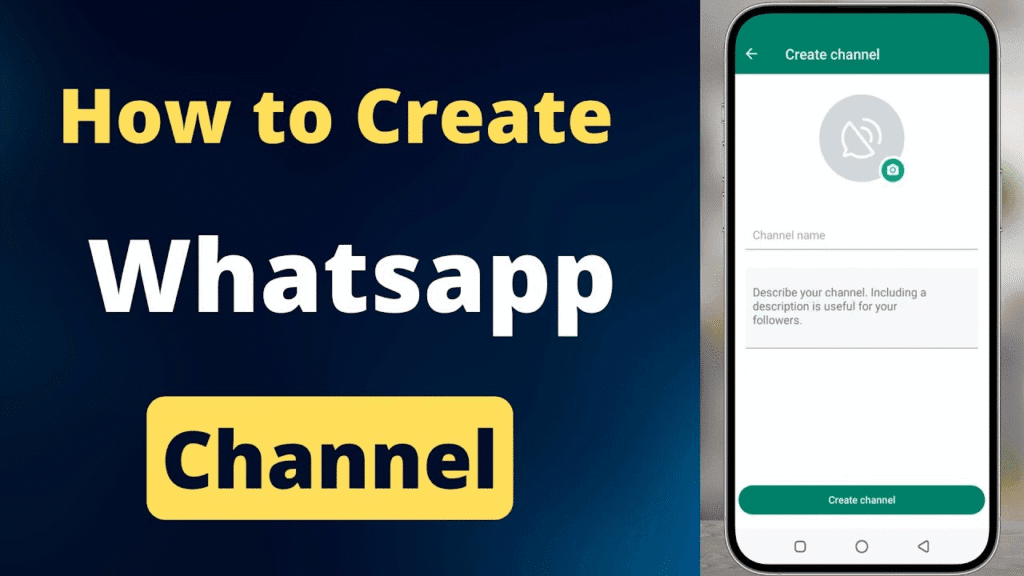
Step 4: Channel Name Choose Karo
Apna Channel Name likho — yahi aapki identity banega.
Example:
- TechWithLaddoo
- DailyNewsIndia
- FitnessFunda
👉 Try to keep it unique, short, aur searchable.
Step 5: Channel Description Add Karo
Description wo jagah hai jahan aap bataoge channel kis purpose ke liye hai.
Example:
“Get the latest tech updates, gadget reviews, and digital news daily!”
SEO tip: Description me apna keyword zarur likho jaise — “WhatsApp Channel for Tech Updates”.
Step 6: Channel Icon Lagao
Profile photo add karo — brand logo ya personal picture.
Ye pehla impression hota hai, so keep it clear & attractive.
Step 7: Create Button Pe Tap Karo
Ab “Create Channel” pe tap karo.
Congratulations! 🎉 Aapka WhatsApp Channel ready hai.
💻 WhatsApp Channel Desktop Se Kaise Banaye (For Web Users)
Agar aap laptop/desktop use karte ho, to:
- Open web.whatsapp.com
- QR code scan karke login karo.
- Left sidebar me “Channels” icon pe click karo.
- “+” pe tap karke “Create Channel” choose karo.
- Name, description, aur photo add karke “Create” pe click karo.
⚠️ Note: Windows ke liye abhi Channels feature limited hai. Mac aur Web pe fully supported hai (source: WhatsApp FAQ 2025).
🎨 WhatsApp Channel Customize Kaise Kare
After creation, aap apne channel ko aur personalize kar sakte ho:
- 🖼️ Profile photo change karo
- ✍️ Description update karo
- 🔗 Invite link share karo
- 📢 First post publish karo
To edit →
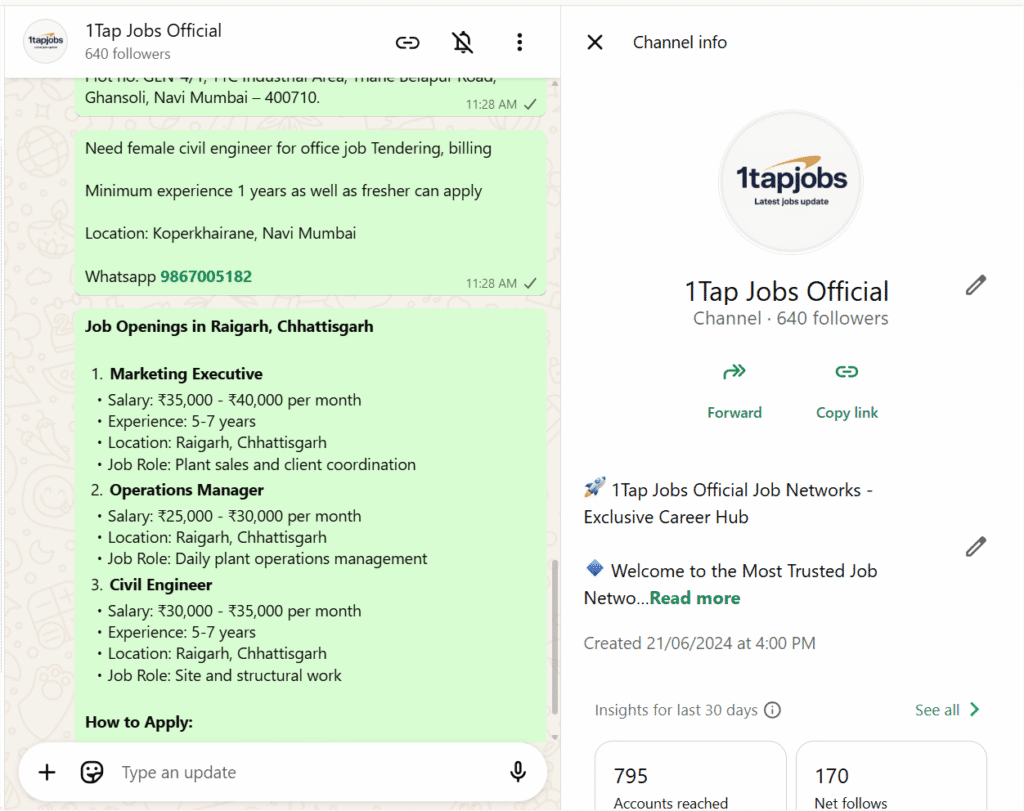
Updates tab → Your Channel → Menu → Channel info → Edit
📤 WhatsApp Channel Me Post Kaise Kare
- Channel khol lo.
- “✉️ Message box” me likho jo update share karna hai.
- Aap images, videos, stickers, aur polls bhi bhej sakte ho.
- “Send” dabao — aur bas, sab followers tak reach ho gaya!
👉 Pro Tip:
Aap polls se engagement badha sakte ho aur short videos se attention grab kar sakte ho.
🔗 WhatsApp Channel Link Share Kaise Kare
Jitna zyada log follow karenge, utna bada aapka reach.
Iske liye aapko apna channel link share karna hoga.
Steps:
- Channel khol lo → 3 dots → Channel info → “Share Link”.
- Ab aap WhatsApp, Instagram bio, Telegram, ya website me link laga sakte ho.
Example:
👉 wa.me/channel/youruniqueid
🛡️ WhatsApp Channel Privacy aur Security
WhatsApp ke Channels one-way broadcast hote hain.
- End-to-End Encryption: Channels ke messages encrypted nahi hote, kyunki wo public content hain.
- Privacy Control: Aapke followers ka naam aur number hidden rehta hai.
- Admin Control: Aap decide kar sakte ho ki kaun follow kare, aur kab content delete karna hai.
“Personal chats remain private & end-to-end encrypted — channels are meant for broadcast only.” (Source: WhatsApp FAQ 2025)
🌍 WhatsApp Channel Global Reach 2025
Meta ke official blog ke mutabiq,
“WhatsApp Channels are now available in 150+ countries and support multi-admin roles, reactions, and updates.”
India me ab har brand, influencer aur even government departments bhi apna official channel chala rahe hain.
Example:
- PMO India Channel
- Cricket Updates Channel
- Bollywood Buzz Channel
💡 Tips to Grow Your WhatsApp Channel (2025 Strategy)
- Consistent Posting – Roz ek ya do meaningful updates.
- Attractive Visuals – Photos aur short clips use karo.
- Clear Branding – Same name, logo aur tone rakho.
- Engage with Polls – Feedback lo, interaction badhao.
- Cross Promotion – Apna link Instagram, Facebook, aur website me daalo.
- Use Hashtags – Yes, hashtags ab WhatsApp Channels me searchable hain.
- Follow Analytics – WhatsApp ab “View Count” aur “Reach Insights” dikhata hai.
🔍 WhatsApp Channel SEO Optimization Tips
Agar aap chahte ho ki aapka Channel Google pe bhi rank kare, ye cheezein follow karo:
| SEO Element | Example |
|---|---|
| Channel Name | Tech News India – WhatsApp Channel |
| Description | Get latest WhatsApp updates, AI news, tech tips daily |
| Keyword Density | 1.5–2% |
| Backlinks | Share link in blog, YouTube, LinkedIn |
| Alt Text (for images) | Use descriptive filenames |
| Consistency | Daily posting builds visibility |
📊 WhatsApp Channel vs Telegram Channel vs Instagram Broadcast
| Feature | WhatsApp Channel | Telegram Channel | Instagram Broadcast |
|---|---|---|---|
| Message Type | Text, photo, video, polls | Same | Text, photo, video |
| Followers’ Privacy | Hidden | Visible | Hidden |
| Encryption | Partial | None | None |
| Reach | High (2.7B users) | Moderate | Limited |
| Platform | Mobile, Web | Mobile, Web | Mobile only |
🔧 WhatsApp Channel Ko Manage Kaise Kare
- Edit Info – Channel info me jaake name/desc change kar sakte ho.
- Delete Message – 30 days ke andar delete option available hota hai.
- Add Multiple Admins – Business Channels me ye feature soon aa raha hai (Meta update 2025).
- Mute Channel – Followers apne hisaab se mute kar sakte hain.
🚀 WhatsApp Channel Future Updates (2025–2026)
Meta ne announce kiya hai ki next updates me ye features include honge:
- 🔔 Notification customization
- 📅 Scheduled posts
- 💬 Comment section (read-only view)
- 💰 Monetization for creators
Yaani WhatsApp Channels sirf news ke liye nahi, earning ka tool bhi banne wala hai.
🧩 Common FAQs About WhatsApp Channels
Q1. Kya WhatsApp Channel personal account se bana sakte hain?
👉 Haan, koi bhi WhatsApp user bana sakta hai — personal ya business dono se.
Q2. Kya followers dekh sakte hain ki channel kisne join kiya?
👉 Nahi, privacy ke liye followers list hidden rehti hai.
Q3. Kya ek user multiple channels bana sakta hai?
👉 Haan, multiple channels allowed hain.
Q4. Kya messages delete ho jate hain automatically?
👉 Haan, channel messages 30 days baad auto-delete hote hain.
Q5. Kya WhatsApp Channel monetize ho sakta hai?
👉 Abhi directly nahi, par Meta 2026 tak monetization laane ki planning me hai.
✨ Final Words: WhatsApp Channel Banake Apni Digital Pehchaan Banao
2025 ke era me WhatsApp Channel sirf ek feature nahi, ek digital identity ban chuka hai.
Yahan aapka message seedha dil tak jaata hai — no ads, no noise, just pure connection.
So, agar aap influencer, business owner, ya content creator ho —
👉 Ab waqt aa gaya hai apna WhatsApp Channel banane ka.
Har update me ek nayi kahani likho,
kyunki digital duniya me consistency hi visibility hai. 🌟
📌 Meta Description (for SEO)
Learn WhatsApp Channel kaise banaye step by step (2025) in this detailed Hindi + English guide. Includes setup, customization, benefits, and SEO growth tips.
📌 Keywords Summary:
WhatsApp Channel 2025, WhatsApp Channel kaise banaye, create WhatsApp Channel, WhatsApp Channel features, WhatsApp Channel benefits, WhatsApp Channel guide Hindi, WhatsApp Channel on WhatsApp Web.
🌟 💥 Stay Updated! 💥
Aise hi latest updates ke liye haamre saath jude rahiye ✨
👉 Join Our WhatsApp Channel-
Join Now :- https://whatsapp.com/channel/0029VbAngHc4NVihSLdhRW3Y
📌 Quick Highlights:
🟢 Rozana trending updates
🔵 Exclusive news & tips
🟡 Direct alerts on your phone
🔥 Don’t miss out—stay ahead with us! 🔥