Google Gemini Politicians Ai Photo Editing Prompt 2025 – Friends, the political excitement related to the 2025 assembly elections is going on in a different way on social media. This time, parties like RJD, BJP and JSP are mainly showing their strength in the elections. And in this environment, many content creator editors, especially Ai lovers who create photos with Ai, are showing their enthusiasm in a different way by creating photos. In which they are creating their own picture with the party they like as per the prompt. People are using different types of prompts to create a picture with the election symbol of their favorite party like lotus symbol for BJP and lantern symbol for RJD and uploading it on Instagram, Facebook and YouTube shorts. So today’s article will provide prompts for creating photos of political parties using Google Gemini.
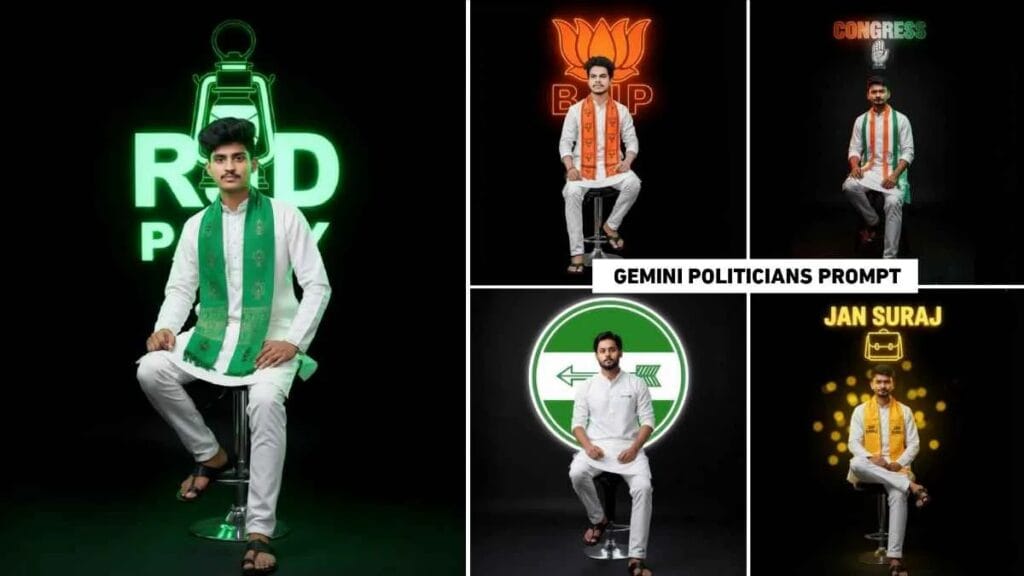
Google Gemini Politicians Ai Photo Editing Prompt 2025
Understanding Google Gemini AI Photo Editing Prompt for Political Campaigns
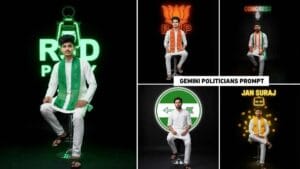
In that type of Ai picture we saw how with the help of Google Gemini the party theme has been given a stylish and realistic look. As we saw in the RJD photo, the neon glow effect of the green lamp has been created and in the BJP photo, the background of the saffron lotus stands out beautifully. All the images you might be seeing related to this on social media have been created using Google Gemini because with Google Gemini we can create absolutely realistic images. Before giving the prompt, we will show some pictures of them so that you can know what kind of picture can be made from which prompt so that you can copy its prompt by looking at the picture. Our prompts not only make your photos look professional but also digitally capture the excitement of the 2025 elections.
Google Gemini Politicians Prompt
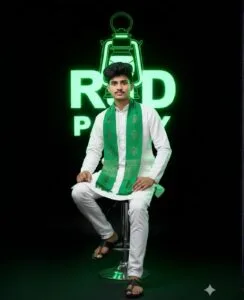
Ultra-photorealistic studio portrait of a man, meanwhile, keeping the same face and hairstyle as in the image. He is sitting on a classy stool, while glowing green lights surround him. The background is black, and moreover, a bold green 3D RJD symbol appears behind him, styled like a fashion poster. He wears a white kurta and white pajamas, along with a green RJD khesh featuring green lantern symbols and black chapals. Finally, the image should have realistic skin texture, soft studio lighting, and sharp details.
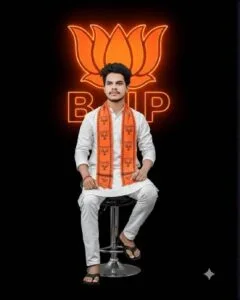
Ultra-photorealistic studio portrait of a man (same face and hairstyle as same in image) sitting on a classy tool, with glowing orange lights. Black background with bold orange 3D BJP Symbol behind him, styled like a fashion poster. He wears a white kurta and and white pajamas with orange BJP khesh with symbols and black chapal,Realistic skin texture, soft studio lighting, sharp details.
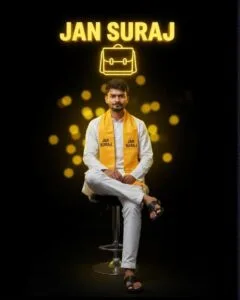
Ultra-photorealistic studio portrait of a man (same face and hairstyle as in the image) sitting on a classy stool, surrounded by yellow glowing lights. Black background with a bold 3D “JAN SURAJ” text and “school ka basta” symbol in the center, styled like a modern poster. He wears a white kurta-pajama with a yellow Jan Suraj stole, and black chappal. Sharp cinematic detail, modern fashion lighting.
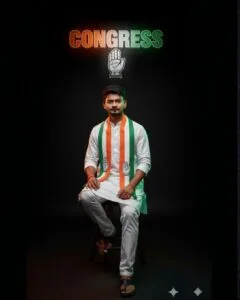
Ultra-photorealistic studio portrait of a man (same face and hairstyle as in the image) while sitting on a classy stool, surrounded by tricolor glowing lights — saffron, white, and green. The background is black, and moreover, it features a bold 3D “CONGRESS” text and hand symbol in the center, styled like a fashion campaign poster. He wears a white kurta-pajama with a tricolor Congress stole decorated with hand symbols, and black chappal. Soft cinematic lighting, ultra-realistic details, elegant composition.
How To Choose Your Favorite Party Photo?
So, if you’re interested in joining the Google Gemini Politicians Ai photo editing team and wondering which party’s photo to choose, first decide on your political preferences. First, consider which party’s ideology or leadership you support. For example, I’ve provided a prompt to create an image for RJD, BJP, and JSP. Your image should reflect the party’s identity and color theme. For example, use green for RJD, saffron for BJP, and yellow tone for JSP. We’ve shown some pictures below. You can identify them by their colors or by looking at their election symbols. For the RJD, there’s a photo with a lantern symbol. If you want to create a copy of that, we’ve provided a prompt below. You’ll find it in a box just copy it.
How To Use Google Gemini Politicians Ai Photo Prompt
I’ve shown you how to select a party photo of your choice and copy its prompt. Those who regularly create photos using Google Gemini will receive the prompt and then create the photo. However, if this is your first time using Google Gemini, don’t worry. In this guide, I’ll explain how to create photos using Google Gemini prompts or any type of prompt in Google Gemini
- First of all open Google Gemini application or website.
- Make sure to login into it with your Gmail ID.
- Click on the Tools button below and select Create Image.
- Now add your photo from gallery by clicking on the plus button.
- Paste the prompt you copied from our website into the message box.
- Click on the send button and wait for a while.
- Your image will be ready in about 5 seconds.
- Click on your created image and save it.
- Go to the gallery and you’ll see your photo in.
How To Get Google Gemini Trending Prompt?
You probably know that everyone loves to create photos with Google Gemini these days. Every day, new people create photos with Google Gemini and share them on social media. If you’re not receiving prompts for those photos, let us tell you how you can get trending prompts. See, I always provide various Google Gemini-related prompts on this website, which are trending on Instagram. If you need prompts for all those images, search Google for “ai prompt razz suman.” Click on the first one. There, you’ll find articles on each type of prompt, from which to create a photo. You can easily find the prompt by clicking on it.
Conclusion
In conclusion, if you want to create a photo with your favorite political party for the upcoming assembly elections, use the Google Gemini Politicians Ai Photo Editing Prompt 2025. It’s the best choice for you. This article explains how to create Ai photos using the election symbols of all political parties. You can even add your own photo to them. We have given prompts of different parties like RJD BJP JSP Congress etc. This trend shows that the intersection of technology and politics is the new digital identity of the future. Whether you’re creating photos for your favorite party or participating in a social media trend.
⚠️ Disclaimer
The information and AI prompts provided in this article — “Google Gemini Politicians AI Photo Editing Prompt 2025” — are intended solely for creative, educational, and informational purposes. The AI-generated images or prompts described here are not affiliated with, endorsed by, or officially connected to any political party, candidate, or organization, including but not limited to RJD, BJP, JSP, or Congress.
All names, symbols, and logos mentioned belong to their respective owners and political entities. The prompts are shared purely for demonstrating AI image generation and digital creativity using Google Gemini tools. Readers are strongly advised not to misuse AI-generated political images for misinformation, campaigning, or influencing public opinion during elections.
Google Gemini, its developers, and this website do not promote or support any political ideology or campaign. Users are responsible for ensuring that the content they create using AI tools complies with local laws, election regulations, and platform guidelines.
In short — let’s keep technology creative, responsible, and transparent. Use AI to express, not to mislead.
🔑 Best Keywords for “Photo Editing Prompt” Article (2025 Edition)
Primary Keywords (High-impact, main focus):
- Google Gemini AI Photo Editing Prompt
- Politicians AI Photo Editing Prompt 2025
- Gemini AI Prompt for Political Photos
- AI Political Photo Maker 2025
- Google Gemini Political Image Generator
- Gemini AI Election Photo Editing
- AI Party Symbol Photo Editing Prompt
- Google Gemini AI Portrait Prompt
Secondary Keywords (to add throughout the article):
- BJP AI photo prompt
- RJD AI prompt
- JSP AI prompt
- Congress AI photo prompt
- AI photo editing trend 2025
- Gemini prompt ideas for elections
- Best AI editing prompts for Instagram
- AI generated political posters
- Google Gemini photo creation guide
- AI editing for election campaign style photos
Hashtags (for social media sharing):
#GoogleGemini #AIPrompt #PhotoEditingPrompt #AIElectionTrend #GeminiAI #AIPoliticalPhotos #GeminiPrompt2025 #AIGeneratedPhotos #AIPortraitEditing #GeminiPhotoMaker
- 5 Huayuan Image 3.0 AI Photo Editing Prompts for Dreamy Cinematic Portraits with Natural Emotion & Floral Aesthetics.
- 15 Powerful Cinematic AI Photo Editing Prompts Cinematic AI Photo Editing Prompts
- Indian couple in cinematic Bollywood style, emotional expressions, dramatic lighting, slow-motion effect, romantic movie scene, ultra-realistic, 4K cinematic frame!
- New Year 2026 Personalized Calendar Design | Best Gemini AI Prompts for Stunning Portrait Images!
- NH-31 Four-Lane Elevated Flyover Project Tender Result Announced – Hari Construction Emerges L1 Bidder