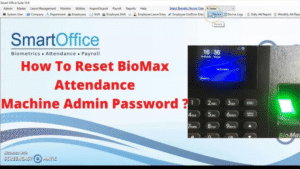
Biomax Device Reset Kaise Kare? (Step-by-Step Guide) | Password & Factory Reset Easy Method
Biomax Device Ko Reset Karne Ke 3 Tarike
1) Soft Reset (Normal Reset / Settings Reset)
Ye tab use hota hai jab device sahi chal raha ho, bas settings default karni ho.
Steps:
- Device On karo.
- Menu me jao. (Menu button model ke hisaab se side / front hota hai.)
- System Settings → Restore Factory ya Default Settings choose karo.
- Confirm karo.
- Device reboot ho jayega.
- 5 Huayuan Image 3.0 AI Photo Editing Prompts for Dreamy Cinematic Portraits with Natural Emotion & Floral Aesthetics.
 70 / 100 Powered by Rank Math SEO SEO Score 12 ChatGPT AI Prompts to Craft Vibrant Cinematic Portraits Full of Emotion 12 AI Prompts for Creating Color-Rich, Emotion-Packed Cinematic Portraits 12 ChatGPT Prompts to Design Striking Cinematic Portraits with… Click for More
 - 15 Powerful Cinematic AI Photo Editing Prompts Cinematic AI Photo Editing Prompts
 86 / 100 Powered by Rank Math SEO SEO Score 12 ChatGPT AI Prompts to Craft Vibrant Cinematic Portraits Full of Emotion 12 AI Prompts for Creating Color-Rich, Emotion-Packed Cinematic Portraits 12 ChatGPT Prompts to Design Striking Cinematic Portraits with… Click for More
 - Indian couple in cinematic Bollywood style, emotional expressions, dramatic lighting, slow-motion effect, romantic movie scene, ultra-realistic, 4K cinematic frame!
 80 / 100 Powered by Rank Math SEO SEO Score 10 Trending Romantic Couple Gemini AI Photo Editor Prompt Copy Paste Ideas for Dreamy Cinematic Edit BY Tezupdate. 12 ChatGPT AI Prompts to Craft Vibrant Cinematic Portraits Full of Emotion… Click for More
 - New Year 2026 Personalized Calendar Design | Best Gemini AI Prompts for Stunning Portrait Images!
 84 / 100 Powered by Rank Math SEO SEO Score New Year 2026 Personalized Calendar Design | Best Gemini AI Prompts for Stunning Portrait Images! 12 ChatGPT AI Prompts to Craft Vibrant Cinematic Portraits Full of Emotion 12 AI Prompts… Click for More
 - NH-31 Four-Lane Elevated Flyover Project Tender Result Announced – Hari Construction Emerges L1 Bidder
 70 / 100 Powered by Rank Math SEO SEO Score NH-31 Four-Lane Elevated Flyover Project Tender Result Announced – Hari Construction Emerges L1 Bidder Project Overview The National Highways Authority of India (NHAI) has officially released the financial bid results… Click for More
 - 12 Best Qwen AI Prompts for Creating Beautiful Boy Portraits on Rattan Swings!
 78 / 100 Powered by Rank Math SEO SEO Score 12 ChatGPT AI Prompts to Craft Vibrant Cinematic Portraits Full of Emotion 12 AI Prompts for Creating Color-Rich, Emotion-Packed Cinematic Portraits 12 ChatGPT Prompts to Design Striking Cinematic Portraits with… Click for More
Isme data delete ho sakta hai ya nahi – model ke hisaab se vary karta hai.
2) Hard Reset (Factory Reset via Back Panel)
Ye tab use hota hai jab:
- Password bhool gaya
- Admin lock ho gaya
- Menu access nahi hai
Steps:
- Device ko power off karo.
- Device ke piche back cover open karo (2–4 screws honge).
- Andar small reset button / jumper pin (RST / J1 / JP1) milega.
- Power ON karte hue Reset Button ko 5–10 seconds press rakho.
- Screen par “Restoring” / “Factory Reset” message aayega.
- Device boot hone do.
Ye method sabse powerful hai. Isme 99% cases me attendance data wipe ho jata hai.
Jugaadu Reset Trick (Biomax Device Without Data Loss)
Device ko off kar do.Phir Menu → 1 → Menu → OK → 1 →
0000000→ OK ka sequence follow karo.Ab Login ka option screen par mil jayega.
Yahan se aap Biometric settings me bina data loss ke enter ho jaoge.
Chaaho to kisi user ko Admin bhi bana sakte ho.
Aur haan, data ko pendrive me export kar sakte ho, safe side ke liye.
Is tareeke se device reset ki zarurat nahi padegi, aur saara data safe rahega.
3) Password Reset via Software (BioMax Software / Cloud)
Agar device server se connected tha to password bina reset ke bhi recover ho sakta hai.
Steps:
- PC me Biomax Attendance Software open karo.
- Device → Device Management me jao.
- Device ko select kar ke Remote Control ya Restore Admin option choose karo.
- Device ko reboot hone do.
- Ab menu open ho jayega.
Ye safe aur recommended method hai agar data save karna ho.
Biomax Models Jo Commonly Use Hote Hain
| Model | Features | Reset Support |
|---|---|---|
| N-BM20 | Fingerprint + RFID | Yes |
| N-BM35 | Face + Fingerprint | Yes |
| BioMax F19 | Access Control + Fingerprint | Yes |
| K30 Pro | Workforce Attendance | Yes |
| T50 | Cloud Sync + Big Screen | Yes |
Model same steup ka hote hain, bas UI thoda different hota hai, par reset logic 90% same.
Data Backup Kaise Le?
Phir bol raha hoon — backup bina reset = apni hi jeb chaku marna.
- Software open karo.
- Download Attendance Logs pe click.
- Excel/CSV me export kar lo.
- USB Backup option ho to device se bhi export kar sakte ho.
Reset Ke Baad Kya Kya Dubara Set Karna Hoga?
- Date & Time
- Attendance Shift
- IP Address / WiFi Settings
- Cloud Server / Static IP Address
- Admin Users
- Fingerprint / Face Enrollments (Agar delete ho gaye to)
Matlab reset ke baad device ek naya janma le leta hai—seedha bachpan wali state.
Troubleshooting After Reset
| Issue | Solution |
|---|---|
| Device time galt dikha raha | Date-Time & GMT Correct Set karo |
| Server connect nahi ho raha | IP, Port, Host, Cloud URL reconfigure |
| Fingerprint detect nahi ho raha | Finger ko clean karo + Re-Enrollment |
| Log sync nahi ho raha | Software me device reconnect karo |
Final Advice:
Hum Gen-Z log tez hain, lekin purane zamano ki ek baat sahi thi:
Reset ek strong action hai – isliye pehle backup lo.
Agar phir bhi device nahi reset ho raha, to Biomax Customer Care ko call karo:
Biomax Support:
+91-79-4007-4010
support@biomaxsecurity.com
Unka team generally remote login se issue solve kar deta hai.
Conclusion
Biomax device ko reset karna mushkil nahi, bas samajh aur patience chahiye.
Soft reset normal problems ke liye theek hai, hard reset tab jab device bilkul lock ho jaye, aur software reset tab jab data bachana ho.
Seedhi, saaf, practical baat.
Machine ko samjho, respect do, aur phir use apne hisaab se chalao.
🙏 Message for Our Respected Members
Hello Dosto,
Sabse pehle aap sabhi ko dil se shukriya 🙏 jo apna valuable time nikaal kar hamara content padhte ho aur is platform ka hissa bane ho. Yeh sirf ek information sharing space nahi hai, balki ek family hai – jahan hum sab ek dusre ko right guidance aur right direction dene ki koshish karte hain.
Hamari aapse humble request hai ki aap hamara content dhyaan se padho aur apne valuable feedback zaroor share karo. Aapka ek chhota sa comment, ek share ya ek suggestion – humein aur hard work karne ka boost deta hai aur naye content create karne ki motivation bhi. 🚀
💡 Hamara Purpose
Hamari koshish sirf information dene ki nahi hai, balki aisi practical knowledge tak pahunchane ki hai jo aapke life aur career mein kaam aa sake.
Chahe topic technology ka ho, jobs ka, infrastructure update ka ya kisi government scheme ka – hamari approach simple, clear aur useful rahti hai.
Aaj ke fast-paced life mein time bahut precious hai ⏳. Isi liye hamari priority yeh hai ki jab bhi aap hamara content padho, aapko lage –
👉 “Yes, this info is actually useful for me!”
⚠️ Important Disclaimer
Hum ek baar fir clear karna chahte hain – kisi bhi transaction, job offer ya official kaam se pehle, hamesha verified source se confirm karo.
Hamari responsibility sirf guide karne aur info provide karne tak limited hai. Kisi bhi tarah ki fraud activity ya money transaction issue ke liye hum liable nahi hain.
👉 Golden Rule: Kabhi bhi kisi unknown person ko bina proper verification ke paise mat do. Online world mein opportunities bhi hain, risks bhi. And in the end, caution is the best protection. 🛡️
📢 Aapka Role Sabse Bada
Aap hi hamare platform ki asli strength ho. Aapka ek ek feedback humein aur improve karne mein madad karta hai.
✔️ Agar content pasand aaye – comment karo.
✔️ Agar lagta hai improvement possible hai – suggestion do.
✔️ Agar lagta hai ye info kisi aur ke kaam aayegi – share karo.
Yeh chhoti chhoti cheezein hi hamare liye gold ki tarah precious hain. ✨
✨ Conclusion
Hum ek family ki tarah grow karna chahte hain – jahan learning aur sharing dono chalu rahe. Aapka ek chhota sa step – chahe ek word ka comment ho, ek simple share ho, ya ek honest suggestion – humein aur dedication se kaam karne ki energy deta hai.
Chaliye, milkar is journey ko aur zyada engaging aur knowledge-rich banate hain.
🙏 Dhanyawaad, connected rahiye aur aage badhte rahiye! 🚀